Trigger a prebuilt automation
Automations are a powerful tool within the Vendasta platform. They can be used to set up unique workflows and create efficiencies.
If you have Automations configured in the Vendasta platform, you can trigger them in a variety of ways. This enables you to set up a complex chain of actions from a single request.
You can trigger Automations built in Partner Center, or on behalf of your clients in their Business App. The triggers are configured in the same manner for both systems.
Automation external triggers
There are three primary types of external triggers for an Automation: Webhook, API, and Zapier. The choice depends primarily on the level of security required for the operations involved, and also on the technologies the partner is already using and familiar with.
- Webhook Trigger — no authentication option; best for non-sensitive Automations.
- Zapier Trigger — used for easy, no-code integrations with thousands of external services.
- API Triggers — requires authentication; use for Automations that contain sensitive operations or that affect billing (e.g. product activations).
The first two options are found under the Advanced section within the Automations trigger list:
API Triggers (object-specific):
- Triggered via API for an order (Advanced section)
- Triggered via API for an account (Advanced section)
- Triggered manually for a company (Manual section)
- Triggered manually for a contact (Manual section)
API Triggers are object specific. In the rare case you need to trigger an ad-hoc Automation that does not involve one of these core objects, the Webhook or Zapier triggers should be used.
Webhook Trigger
The webhook trigger accepts a JSON payload consisting of top-level key-value pairs. One of these values may be an object ID, which will unlock Automation Actions related to that object (including custom objects).
For example, if a payload value of type Account ID is provided, it will enable actions like 'Add an Account to a list'.
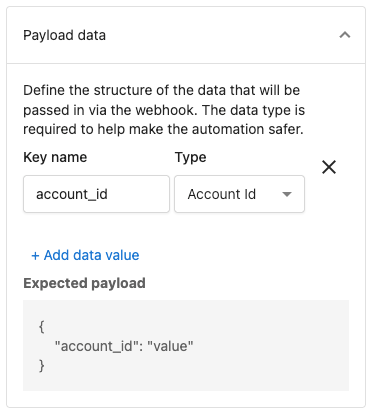
See Data Passing (Why is the step I want to use greyed out?) for more information.
API Triggers
Authentication
Create an access token with at least the business scope following the Authorization guide.
Setup
Create an automation in Partner Center, or Business App, with one of the API Triggers listed above.
Trigger data passing
Data passing into the Automation is only available for the Advanced API Triggers associated with Account and Order objects.
In the Create Automation Run request this data must be provided within the data.attributes.data JSON object.
When designing an Automation to be called via API, the expected data structure must be preconfigured on the Automation Trigger with keys matching those in the API request. By selecting the correct data types during configuration, the Automation can automatically use this data as input for subsequent steps.
If you need to pass data for other objects, the Webhook Trigger should be used, or you can leverage Object Reference Actions (such as 'Get the associated company' or 'Find contact') to pull in the necessary object data within the Automation flow.
Request
The API triggers use the Create Automation Run endpoint.
To trigger an automation run, two data points are required: the ID of the Automation (found in the URL as Automation-***) and the object ID, which is provided as attributes.entityId.
relationships.businessLocation and relationships.order are deprecated. Pass the ID in attributes.entityId instead.
- Request
- Request body
This API call has an empty response.
curl -X POST 'https://prod.apigateway.co/platform/automationRuns' \
  -H 'Authorization: Bearer <Token with "business" scope>' \
  -H 'Content-Type: application/vnd.api+json' \
  -d '{
    "data": {
      "type": "automationRuns",
      "relationships": {
        "automation": {
          "data": {
            "type": "automations",
            "id": "Automation-91cb048c-c498-43ba-ab99-2ca2d27d2c46"
          }
        }
      },
      "attributes": {
        "entityId": "AG-6TRBKMP2BQ",
        "data": {
          "optional_key": "optional_value"
        }
      }
    }
  }'
{
  "data": {
    "type": "automationRuns",
    "relationships": {
      "automation": {
        "data": {
          "type": "automations",
          "id": "Automation-91cb048c-c498-43ba-ab99-2ca2d27d2c46"
        }
      }
    },
    "attributes": {
      "entityId": "string",
      "data": {
        "optional_key": "optional_value"
      }
    }
  }
}
For more details on this endpoint see Create Automation Runs.